Bank Statement Reconciliation

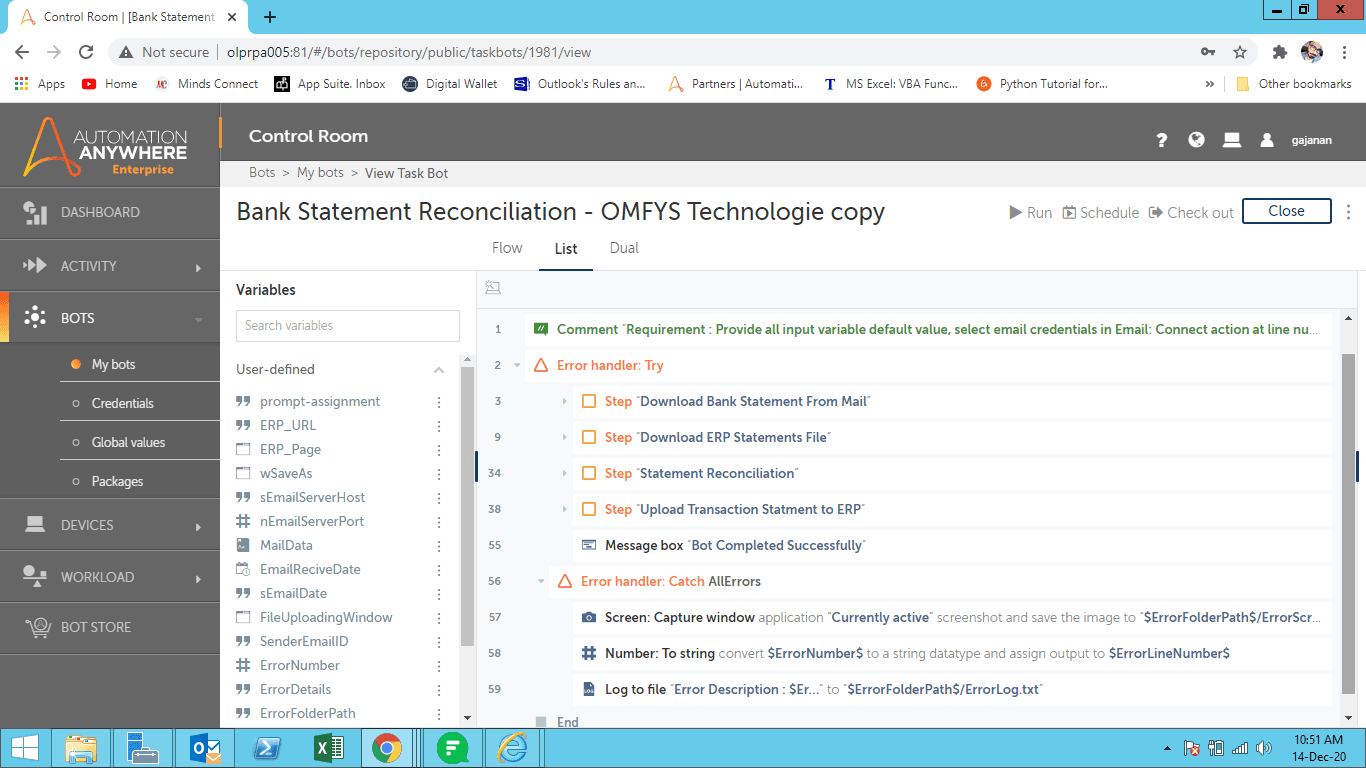
This bot downloads bank statements for mail server and transaction statements from the ERP system then reconciles bank statements and transaction statements

Top Benefits

  • Removes the manual effort to download the bank statement file from mail & transaction statements from ERP
  • Removes the manual efforts of reconciling sensitive data
  • Bank statement reconciliation process, which reduces human intervention
Product video fallback

Tasks

  • Download bank statement file from mail
  • Download transaction statements from ERP
  • Reconcile both files through script file
  • Upload output file to ERP System
Bank statement reconciliation is a summary of banking and business activity that reconciles an entity's bank account with its financial records. The statement outlines the deposits, withdrawals, and other activities affecting a bank account for a specific period of equity.

Setup process

Install

Download the Bot and follow the instructions to install it in your AAE Control Room.

Configure

Use the Bot in a bot, configure keys and other credentials the Bot will need (see the ReadMe for details.)

Run

That's it - now the Bot is ready to get going!

Requirements and Inputs

  • Required to pass values in variable those follow as below:
  • sEmailServerHost - Provide email server host name to check received mail from server
  • nEmailServerPort - Provide email server port number to check received mail from server.
  • AttachmentFolderPath – Provide input folder path to store bank statement attached file and transaction statement file
  • SenderEmailID - Provide sender email ID for receiving bank statements file from mail server.
  • ErrorFolderPath - To store error details
  • Create credential vault to store email ID and password, select email credentials in email: connect action at line no. 5

Customer Reviews

0.0(0 reviews)

No reviews yet.