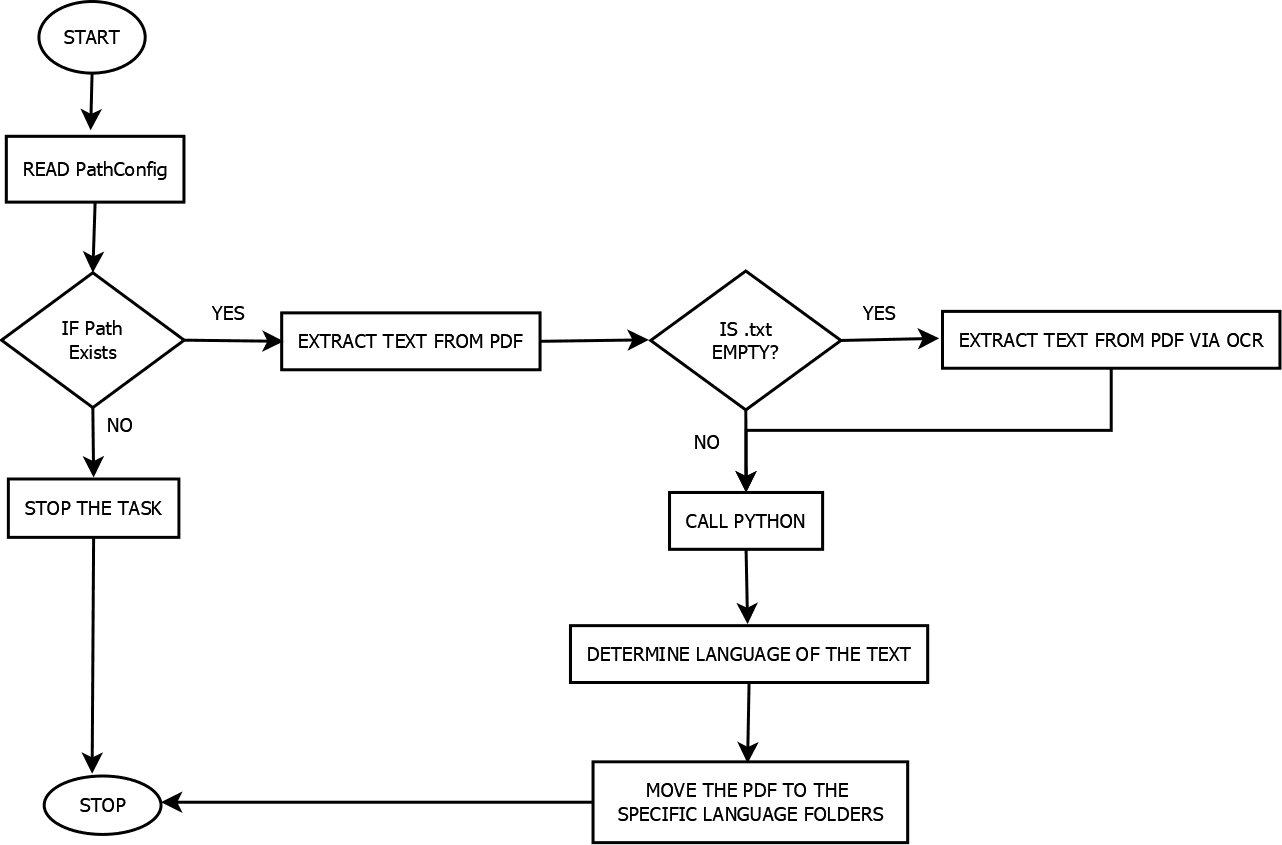
The Language Detection bot takes the PathConfig.xml as an input. PathConfig.xml and detectLanguage.py python files should be uploaded to the control room. The user must update the Config file according to the local folder structure. Input folder path, Output folder path, and Log folder path need to be updated in the config.
The bot reads the config file and extracts the text from the PDF (Input). If the text file is empty, then the PDF is a scanned PDF. For scanned PDFs, the bot extracts the text via OCR. The python script uses three libraries to detect the language of the text. The decision is based on the higher confidence percent detected. After determining the language, the PDFs are moved to the language-specific folders. As an output, the bot creates the language-specific folders which contain the PDF of that language.
In AP Invoicing Processes, where the Invoices need to be fed into the IQ bots based on their languages. It would not be possible to categorize the PDFs based on their language without any extra information. The Language Detection bot comes into the picture. It can detect the language of a PDF without any further information associated with the PDF Document.
Also, if the input PDF comes as a scanned PDF instead of a native one, then also it would be difficult to read the PDF. However, the Language Detection bot has the capability to read the text of the scanned document and categorize the document based on language. To do so, the bot uses the OCR functionality and the Python script to determine the language of the text in the PDF
The Language Detection Bot can detect 97 languages. As the Language Detection Bot uses PDF extraction OCR and Python script to detect the language of the PDF, it takes approximately ~1.5 sec per file. During the testing of 209 PDFs, it took 5mins for execution. Hence, the Language detection bot detects the language of a PDF in significant execution time.