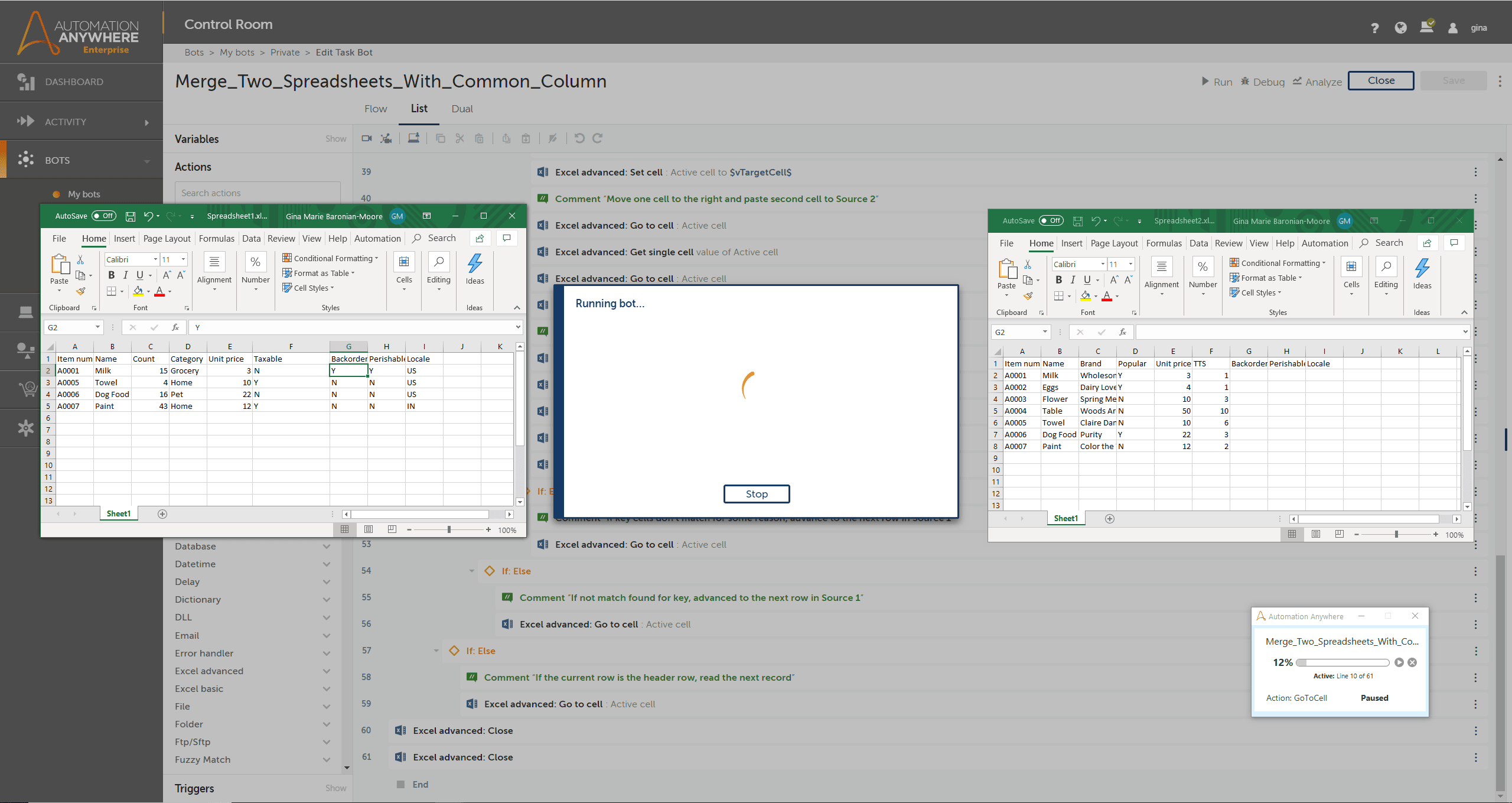
This bot is a simple starter example of using the Excel Advanced package in Automation 360. It reads two spreadsheets and determines where they have common values in column A, such as a product number. When there is a match, it reads columns G, H, and I from the first spreadsheet (source) and copies them over to the same columns in the second (target). The bot loops through every row of both spreadsheets to ensure all updates complete.
Use this bot as a starting point to get familiar with the Excel Advanced package, and change the number of times the bot loops to update whichever columns you choose.
Here's a case where this bot could provide many benefits. Let's say the shipping and accounting departments maintain their own spreadsheets containing product information, and both spreadsheets store product number in column A. Shipping needs to periodically share information they added to their spreadsheet (source) with Accounting (target), who can run this bot to automatically merge the data.
Because the manual task of copying cell values in separate spreadsheets is very time-consuming and laborious, this bot can save significant revenue and work hours. Manual, mundane tasks like this invite human error through mistype, distraction, and other factors. Now you can perform in seconds what could take hours for a human to do, and free them to perform other tasks that require human evaluation and judgment. Save money by expediting the completion of the task, and eliminating errors that may need later adjustment.