Agentic Automation for Claims Adjudication

An agent-driven claims workflow that validates data, auto-adjudicates standard claims, routes exceptions to humans, and updates systems with faster decision.

Top Benefits

  • Business Outcome Processing Time Reduction 60–75% faster turnaround time
  • Up to 69% reduction in FTE effort for claims validation and adjudication.
  • 80% manual effort savings in risk analysis and exception handling
  • 85% straight-through processing rate achieved in automated workflows.
  • 95%+ data extraction accuracy from unstructured PDFs using UiPath Document Understanding.
Product video fallback

Tasks

  • ClaimAdjudication_Main
  • SalesForceEntry
  • AI_EmailGenerator
  • AI_ValidateClaimDetails
  • AI_ExtractDetails
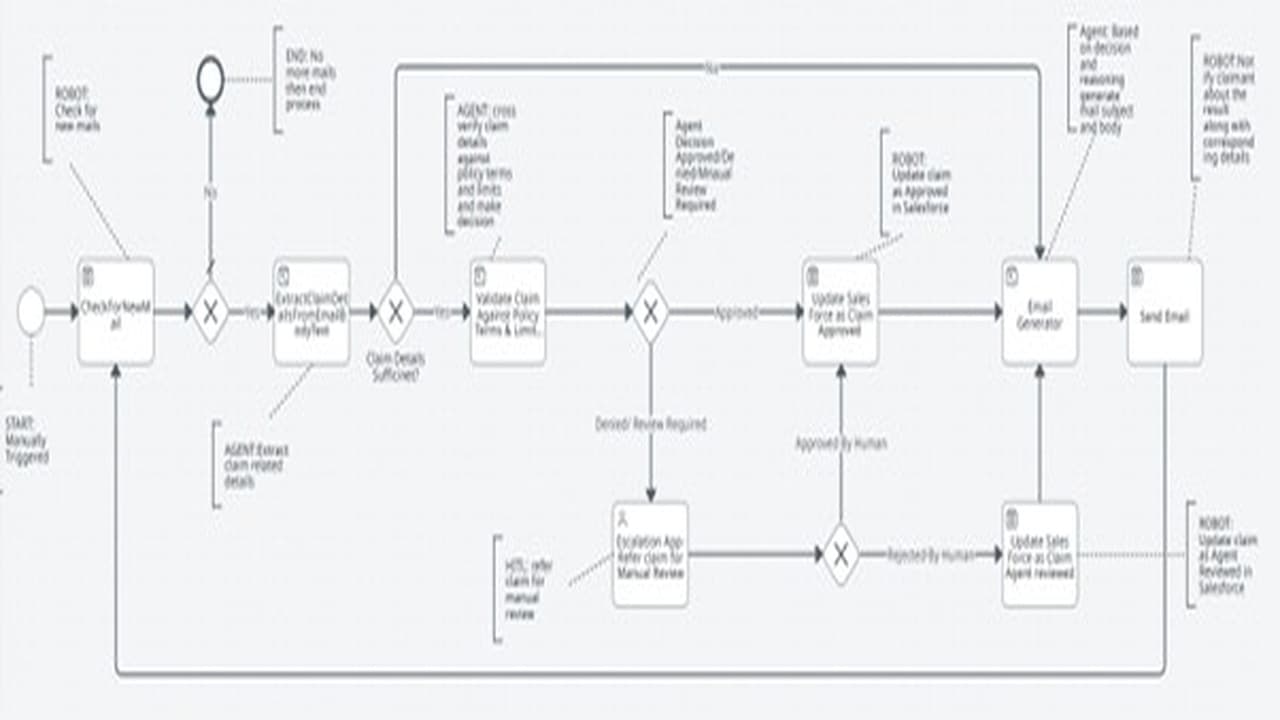
Input Stage: Claim details are received via email in either structured or unstructured formats. An agent validates the claim for completeness. If mandatory information is missing, an automated email is sent requesting the required details. Processing Stage: Complete claim details are validated against policy terms and coverage limits. Based on validation results, the agent decides whether to approve the claim automatically or route it for human review. HITL (Human-in-the-Loop): Claims flagged for review are assigned to a claim examiner. The examiner evaluates the claim and updates the decision in Salesforce. End Processing: Based on the final decision, the claim is approved or rejected in Salesforce using an API call. A notification email is sent to the claimant communicating the approval or rejection outcome.

Setup process

Install

Download the AI Agent and follow the instructions to install it in your AAE Control Room.

Configure

Use the AI Agent in a bot, configure keys and other credentials the AI Agent will need (see the ReadMe for details.)

Run

That's it - now the AI Agent is ready to get going!

Requirements and Inputs

  • 1. Config File and Policy Terms file is updated to AA Control Room
  • 2.Local machine should have Folder structure for Logs "C:UsersUSERNAMEDocumentsAA BountyClaim AdjudicationLogs"
  • 3.Email Subject should contain Wording "Claim"
  • 4.Outlook should contain email with all details of claim
  • 5.Requires Outlook in the bot run machine

Customer Reviews

4.0(1 review)
5 star0%
4 star100%
3 star0%
2 star0%
1 star0%
Ease of Use4.0
Functionality & Reliability4.0
Documentation & Samples4.0

Aditya Wattamwar