Auto Download & Installation of Multiple Applications

This bot is developed to download and install multiple applications silently in the background and generate a detailed log file to check the status

Top Benefits

  • Makes it easy to download and install multiple applications
  • Reduces manual intervention
  • Downloads & installs applications silently in the background
  • 100% accuracy
Product video fallback

Tasks

  • Reads the name of the applications from input file
  • Downloads & installs the respective applications silently
  • Generates a detailed log file to confirm the status of each applications
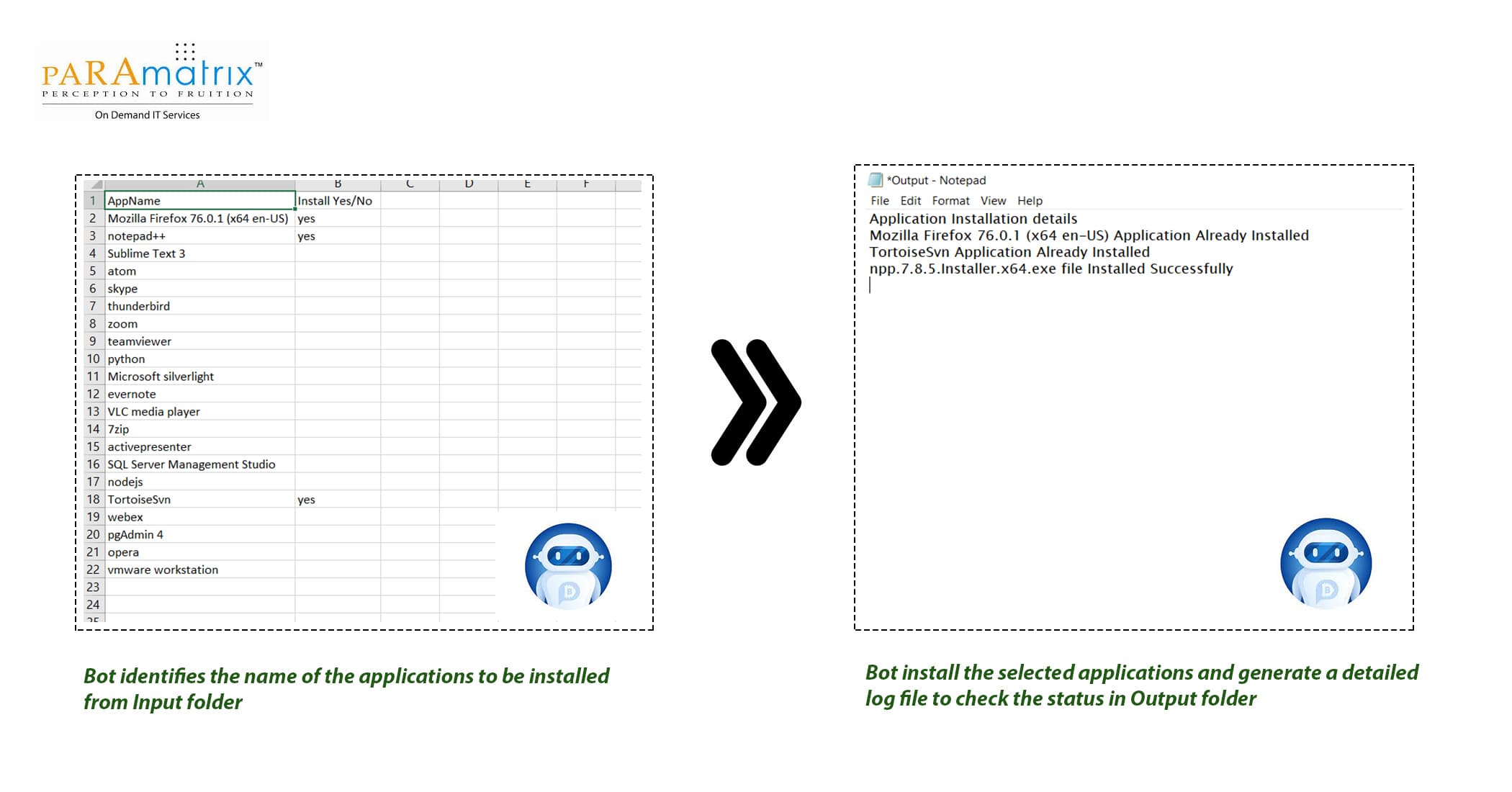
This bot is developed to download & install multiple applications silently in the background and append their status in output folder. The list of all applications is available in input folder.  The user has to specify either Yes or No against each each applications which he wishes to download & install. The user has to enable the PowerShell script before running the bot.  (Please refer to the Readme file to enable PowerShell script.) Once the user execute the bot, it identifies whether the application is already exist in the system or not. If application already exist, it does not allow to download setup file.  If not, it starts download of the setup file & installs the list of all applications respectively. Use case: 1.User can select name of the applications to be download from input file. 2. Run the bot 3. Detailed log file is generated to check the status in output folder. Below are the some of the applications available to user to select from Input file. 1. Mozilla Firefox 2. Notepad++ 3. Sublime Text 3 4. Atom 5. Skype 6. Thunderbird 7. Zoom 8. Team viewer 9. Python 10. Microsoft Silverlight 11. Evernote 12. VLC media player 13. 7zip 14. Active presenter 15. SQL server management studio 16. Node.js 17. TortoiseSVN 18. WebEx 19. PgAdmin4 20. Opera 21. VMware workstation 22. Xmind

Setup process

Install

Download the Bot and follow the instructions to install it in your AAE Control Room.

Configure

Use the Bot in a bot, configure keys and other credentials the Bot will need (see the ReadMe for details.)

Run

That's it - now the Bot is ready to get going!

Requirements and Inputs

  • User has to enable the Powershell script before running the bot
  • Excel

Customer Reviews

0.0(0 reviews)

No reviews yet.