AWS SQS Package
Connect Automation 360 bots with Amazon SQS to send, receive, and delete queue messages.
Top Benefits
- Connects Automation 360 bots directly with AWS SQS queues.
- Reduces custom coding/scripting by providing reusable AWS SQS actions.
- Supports queue-based integration between bots and cloud applications.
- Enables reliable message send, receive, delete, and purge operations.
- Improves scalable, asynchronous processing for enterprise workflows.
Tasks
- Start an authenticated AWS SQS session.
- Send messages to an AWS SQS queue.
- Receive messages from an AWS SQS queue.
- Delete processed messages using receipt handles.
- Get AWS SQS queue attributes.
The AWS SQS Automation Package enables Automation 360 bot developers to integrate bots with Amazon Simple Queue Service without writing custom Java, Python, or REST API scripts inside each automation.
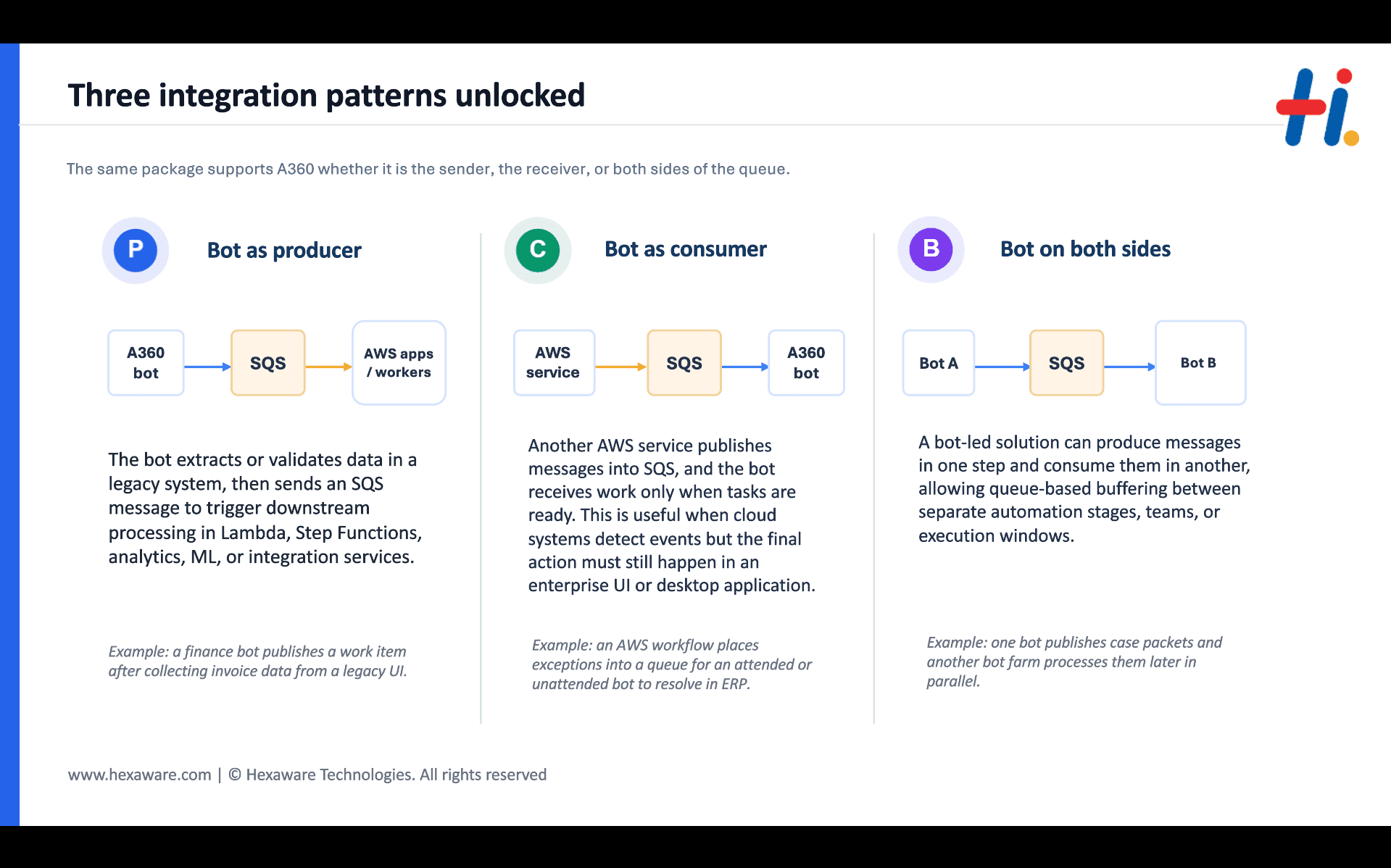
This package provides reusable actions to start an AWS SQS session, send messages to a queue, receive messages from a queue, retrieve queue attributes, delete processed messages, purge queue messages, and end the active session. It is useful for event-driven automation, bot-to-system communication, asynchronous processing, queue-based workload distribution, and integration between Automation 360 and AWS-hosted applications.
Actions Included:
Start Session
Send Message
Receive Messages
Get Queue Attributes
Delete Message
Purge Queu
End Session
The included demo bot shows how to configure the package, connect to AWS SQS, send a test message, receive it, process the receipt handle, and delete the message from the queue. Users must provide their own AWS credentials, AWS region, and SQS queue URL, and must ensure that the IAM user or role has the required SQS permissions.
This package is intended for Automation 360 developers, RPA teams, cloud integration teams, and platform teams that want a reusable, maintainable way to connect Automation Anywhere bots with AWS SQS.

Free
- Applications
-
- Business Process
- RPA DevelopmentSoftware Developme...
- Category
- ProductivityRPA Developer Tool...Utility
- Vendor
- Automation Type
- Bot
- Last Updated
- May 12, 2026
- First Published
- April 9, 2026
- Platform
- Automation 360
- ReadMe
- ReadMe
- Support
-
- Community Support Only
- Pathfinder Community Developer Forum
- Agentic App Store FAQs
Setup Process
Install
Download the Bot and follow the instructions to install it in your AAE Control Room.
Configure
Open the Bot to configure your username and other settings the Bot will need (see the Installation Guide or ReadMe for details.)
Run
That's it - now the Bot is ready to get going!
Requirements and Inputs
- Automation 360 Control Room with permission to import/upload custom packages.
- Valid AWS account with Amazon SQS queue configured
- AWS Access Key and Secret Key stored securely in Credential Vault
- AWS region and SQS Queue URL
- IAM permissions for SQS actions such as SendMessage, ReceiveMessage, DeleteMessage, GetQueueAttributes, and PurgeQueue