PDF Utilities Advanced

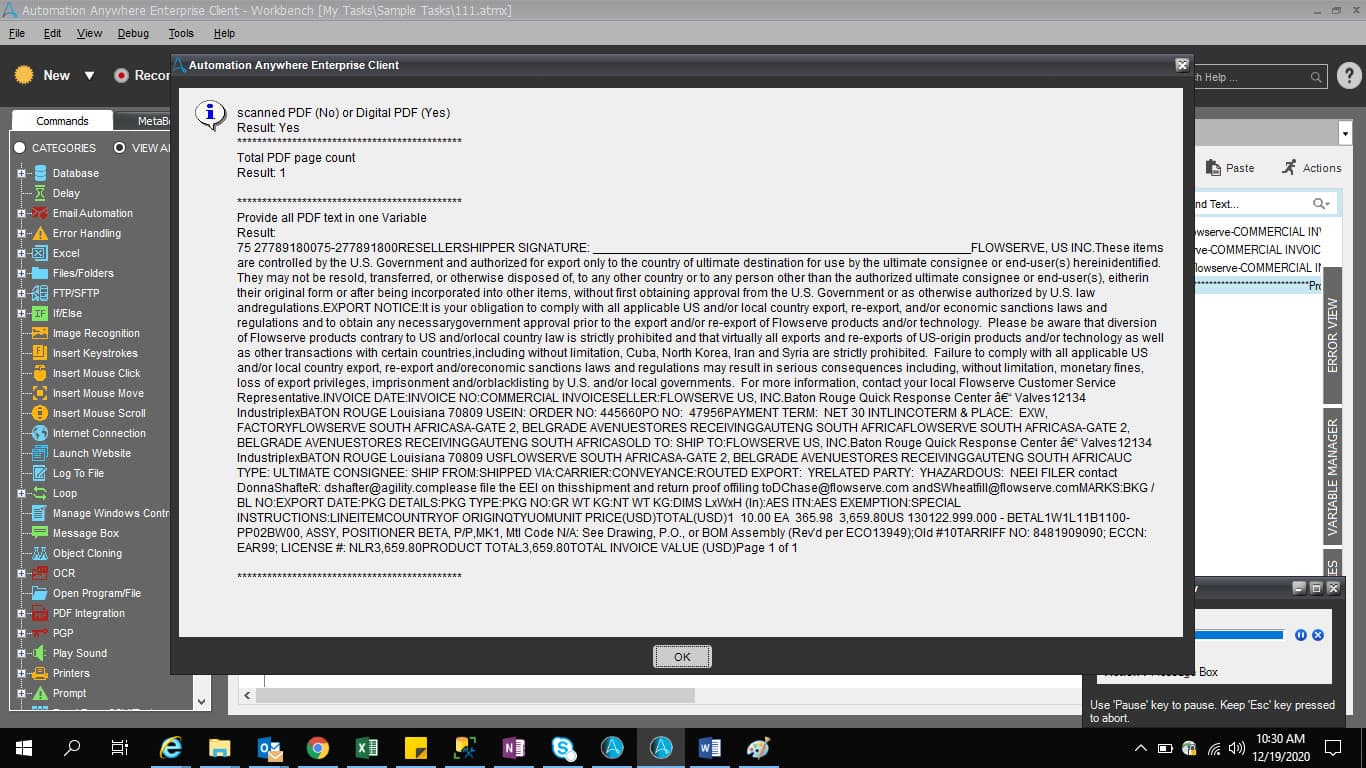
This bot takes a PDF file path as the input. It then provides the total PDF page count, all PDF text in one variable, and identifies whether the PDF is scanned or digital

Top Benefits

  • Easy way to distiguish whether your PDF is of scanned or digital format
  • Provides the total PDF page count
  • Fastest way to identify the PDF formats
Product video fallback

Tasks

  • Identify scanned PDF (No) or digital PDF (Yes)
  • Provide total PDF page count
  • Provide all PDF text in one variable
Inputs and triggers: Provide only a complete PDF file path Identify Scanned PDF (No) or Digital PDF (Yes) Action: The bot will validate the PDF data Outputs The bot will provide Yes- Digital PDF or No- Scanned PDF Total PDF page count Action: The bot will count the PDF pages Outputs: The bot will provide PDF page count as a Number like 10 All PDF text in one Variable Action: The bot will read the text in the PDF and save the text Outputs The bot will provide all PDF text in one Variable

Setup process

Install

Download the Bot and follow the instructions to install it in your AAE Control Room.

Configure

Use the Bot in a bot, configure keys and other credentials the Bot will need (see the ReadMe for details.)

Run

That's it - now the Bot is ready to get going!

Requirements and Inputs

  • Just provide the PDF complete file path

Customer Reviews

0.0(0 reviews)

No reviews yet.