
Supply Chain Risk Agent
Proactively manage logistics risks. This AI Agent monitors weather conditions, identifies shipping delays, and suggests alternative vendors for manager approval
Top Benefits
- Reduce shipping delays: Proactively reroute orders before weather impacts delivery timelines.
- Automated decision support: AI analyzes complex data to recommend the best alternative suppliers instantly.
- Ensure business continuity: Maintain supply lines even during severe weather disruptions.
- Seamless human collaboration: Keeps managers in control with a streamlined approval interface.
- Audit trail: Automatically logs risk decisions and actions back into the ERP/Excel records.
Tasks
- Supply Chain Risk Analysis (AI Skill)
- OpenWeatherMap API Integration (Action)
- Excel Data Manipulation (Task)
- Human-in-the-Loop Approval (Form)
- Automated Email Notification (Task)
Unpredictable weather events are a major cause of supply chain disruptions, often leading to missed delivery deadlines and financial loss. The "Supply Chain Risk Agent" acts as an intelligent logistics control tower to solve this problem autonomously.
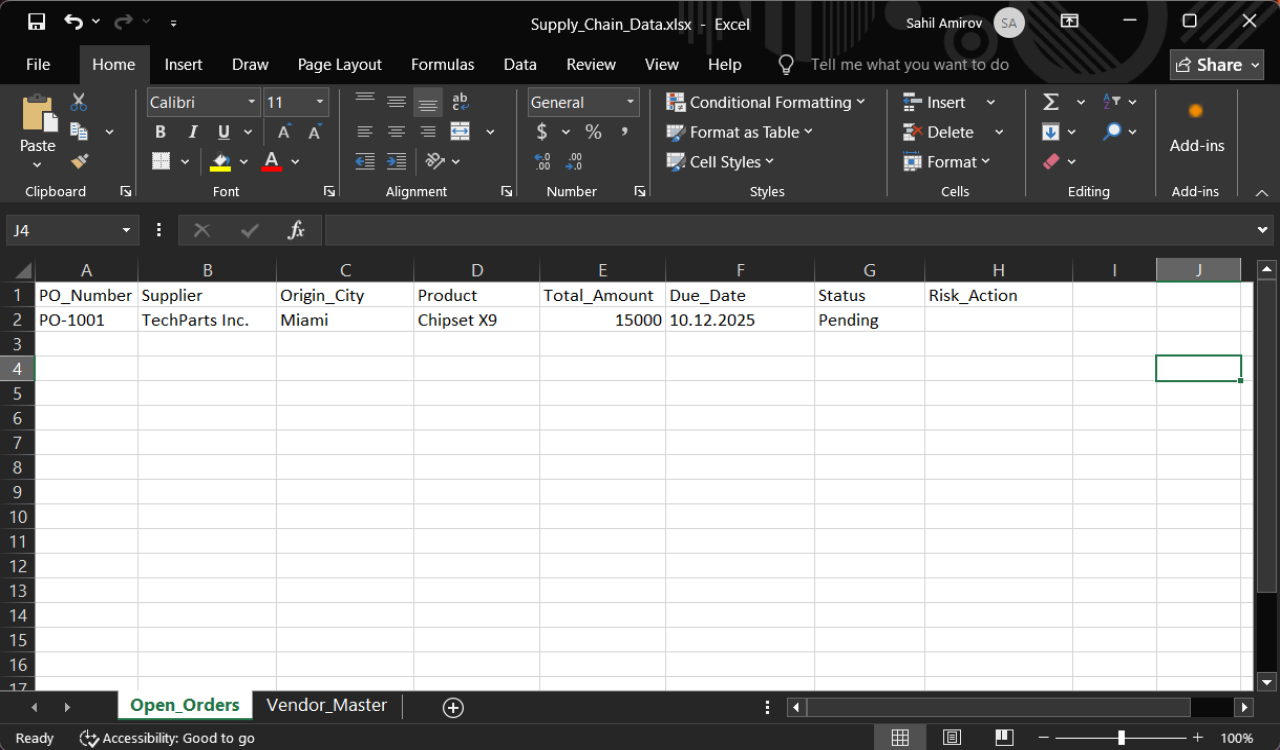
Instead of requiring manual checks, this Agent reads "Open Orders" from your ERP export (Excel) and validates the weather conditions at the shipment's origin city using the "OpenWeatherMap" API. It doesn't just flag risks; it uses "Generative AI reasoning" to find solutions.
How it works:
1. Detect: Identifies orders originating from high-risk weather zones (e.g., Storms, Hurricanes).
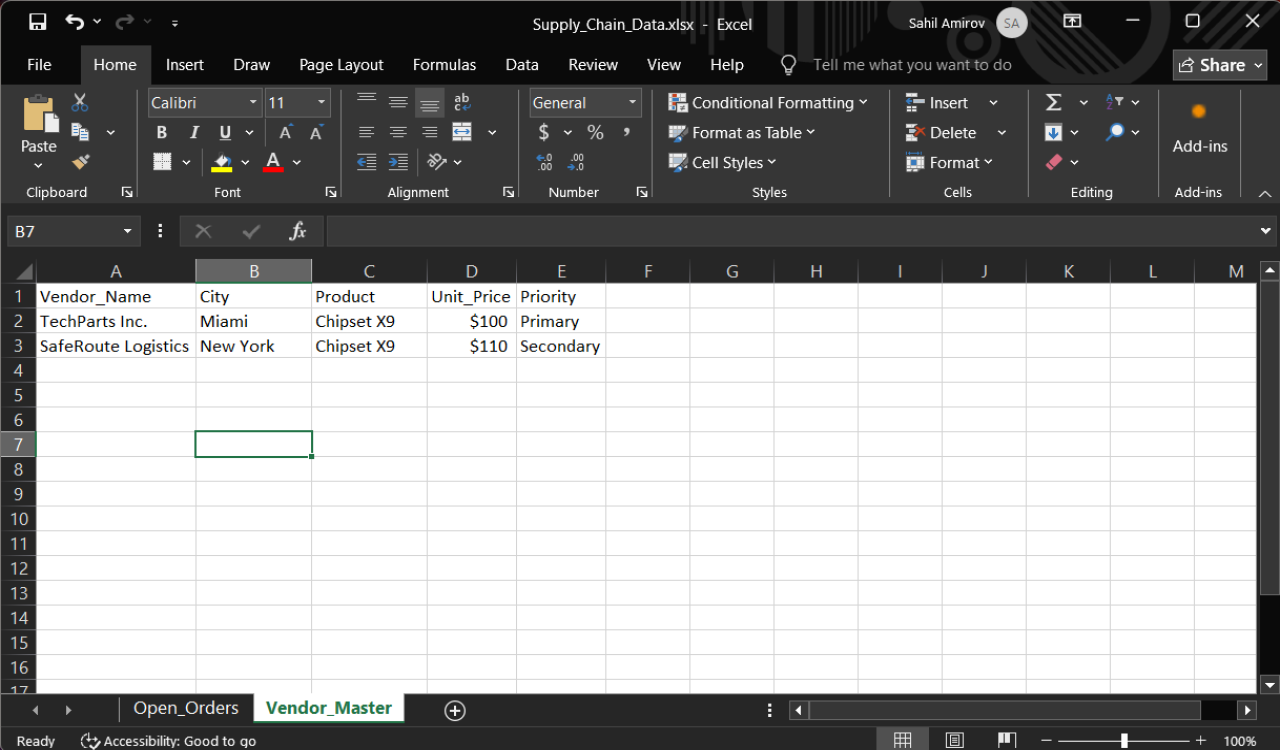
2. Reason: Scans your "Approved Vendor Master" list to find suitable alternative suppliers located in safe regions.
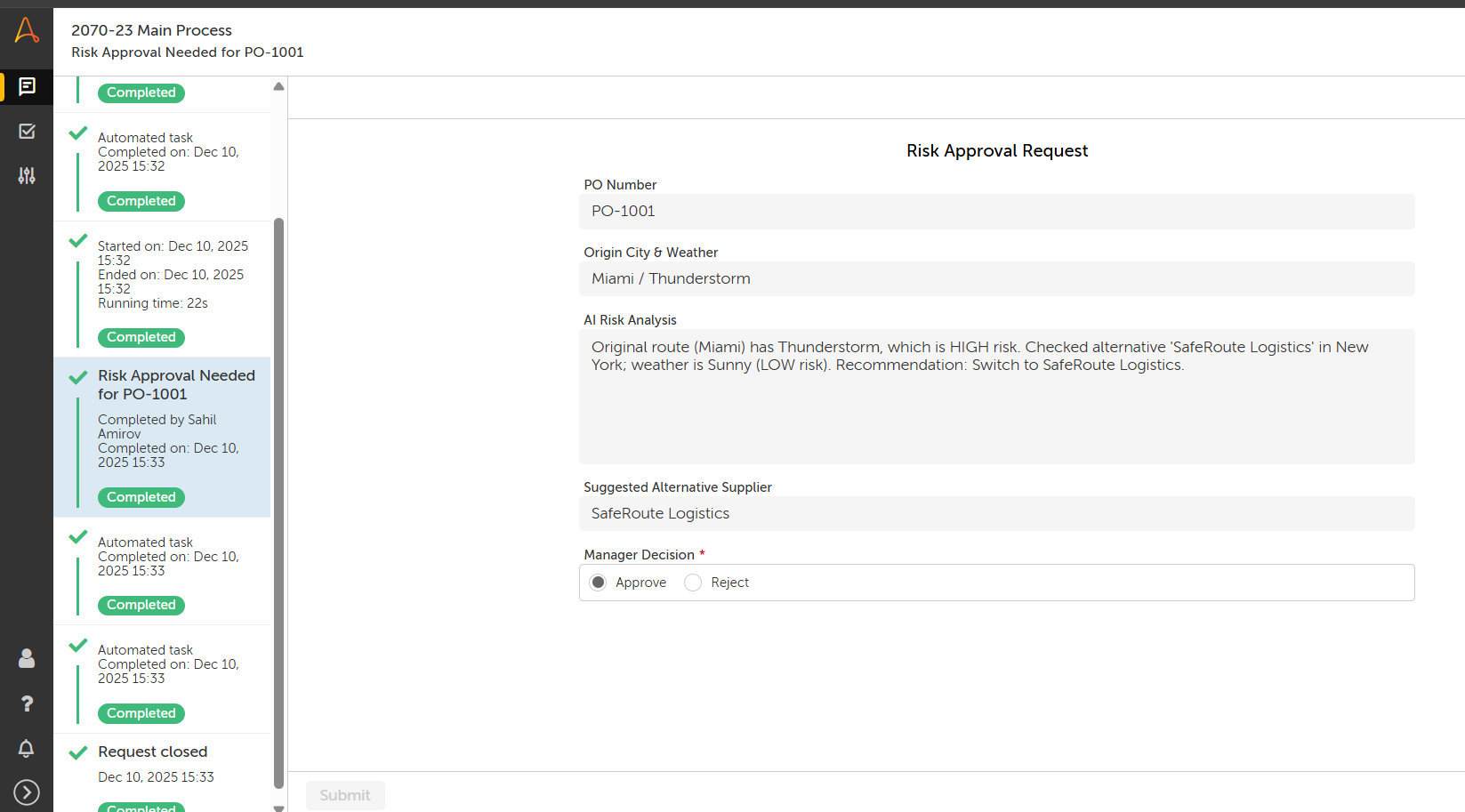
3. Collaborate: Triggers a Human-in-the-Loop (HITL) form, presenting the risk analysis and the suggested alternative to the Supply Chain Manager for a one-click decision.
4. Execute: Automatically updates the order status in Excel and sends email notifications to stakeholders based on the manager's decision.
This Agent transforms a reactive process into a proactive, resilience-building workflow.

Success
The download of Supply Chain Risk Agent will begin shortly.
In your Control Room, use the ‘Import’ button to load the downloaded file into your Automations.
Free
- Applications
-


- Business Process
- Shipping & DistributionSupply Chain Management
- Category
- Artificial Intelligence
- Vendor
- Pathfinder Community
- Automation Type
- AI Agent
- Last Updated
- January 21, 2026
- First Published
- January 21, 2026
- Platform
- Automation 360
- ReadMe
- ReadMe
- Support
-
- Community Support Only
- Pathfinder Community Developer Forum
- Agentic App Store FAQs
- Bot Security Program
-
 Level 1
Bot Security
Level 1
- All automations on Agentic App Store have passed a malware scan.
Bot Security Program
Automation Anywhere Bot Security is the APA industry's first of its kind bot security framework. In partnership with cyber security experts, Bot Security encompasses four (4) progressive levels of security designation. All automations including those built in-house or procured from Agentic App Store, can now be deployed reliably with secure automation development practices in alignment with prevailing Confidentiality, Integrity, and Availability (CIA) cybersecurity principles and best practices. View full Bot Security details.
See the AI Agent in Action
Setup Process
Install
Download the AI Agent and follow the instructions to install it in your AAE Control Room.
Configure
Open the Bot to configure your username and other settings the Bot will need (see the Installation Guide or ReadMe for details.)
Run
That's it - now the AI Agent is ready to get going!
Requirements and Inputs
- Automation Anywhere Control Room (A360)
- OpenWeatherMap API Key
- Microsoft Excel (Office 365 or Desktop)
- Input File: Supply_Chain_Data.xlsx (Template provided in package)
Customer Reviews
